CleanAllTheLeaves
Area unlocks

Clean All the Leaves Locked Door: How to Unlock New Areas and Zones

Fix locked-area progression by completing the current zone, checking the journal, verifying purchases and waiting for wave completion before searching for an invented key or code.

clean all the leaves locked doorclean all the leaves unlock new areasclean all the leaves zone unlock
Quick answer

What to do

When a door or route stays locked, finish the current accessible objective, wait for its completion state, check the journal for the next requirement and inspect the newly opened transition. Do not follow unverified prices, keys or secret codes from unrelated guides.
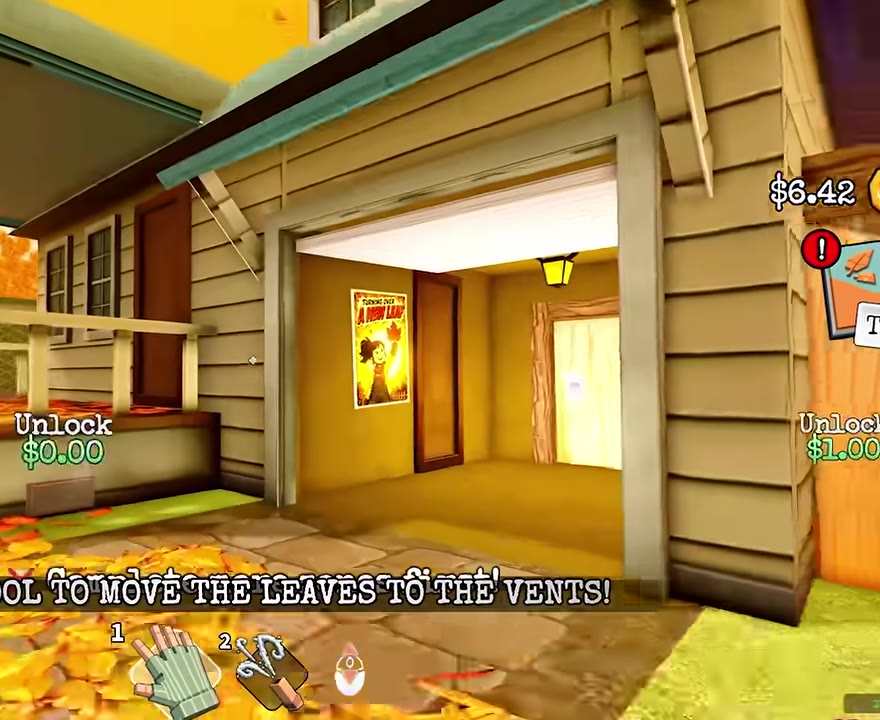
Garage transition used during Clean All the Leaves map progression
Gameplay-only frame cropped to exclude the video creator and channel identity.
Step 1

Understand the official progression rule

The official Roblox description confirms that new parts of the map open as players progress. It does not publish every threshold, price or interaction. The current objective and journal are therefore more reliable than a third-party numeric unlock table.

Garage entrance after progression changes map access
Gameplay frame from the reviewed full-run footage; creator overlay removed by cropping.
Step 2

Run the unlock check in order

Complete the leaves you can currently reach, wait for any new wave, verify the area state, open the journal and read the next unchecked objective. Then revisit the visible door, gate or transition rather than searching the entire map.

  • Finish reachable corners and thresholds.
  • Wait for progress to update.
  • Confirm required purchases in the journal.
  • Revisit the transition after the state change.
Step 3

Common reasons a route stays locked

One ordinary leaf may remain, a second wave may not be finished, a purchase may not have registered or the player may be checking a later route before its connected zone. Diagnose those visible states before assuming a bug.

  • Use the 99 percent perimeter checklist.
  • Check farm and basement wave status.
  • Equip or reopen a newly purchased item if the objective remains unchecked.
Step 4

What not to trust

Search results currently contain unsupported area names, exact costs, special tools and hidden triggers that conflict with the reviewed run. This page intentionally refuses to turn those claims into instructions without current game evidence.

FAQ

Common player questions

Why is the next area still locked?

The current zone or connected objective may be incomplete. Check remaining leaves, wave state, journal purchases and the transition again in that order.

Is there a secret door code?

No verified public source reviewed for this update establishes a universal door code. Follow the live objective and progression state.

Evidence boundary

How this guide was checked

This page uses observations from linked public gameplay footage and cross-checks the official Roblox experience description. A cited video observation is not the same as a current live-game verification: exact prices, rewards, timers and mechanics may change, so the live game UI takes priority.

Claims without a matching timestamp or current in-game check should be treated as provisional. The live game UI takes priority for update-sensitive details.

Related guides

Continue the route